Mailchimp Is Being Sold to Bending Spoons: What Changes, and How to Move Your List Safely If You Leave
Bending Spoons has agreed to buy Mailchimp from Intuit for $3.68 billion. Here's what is confirmed, what nobody knows yet, what to back up today, and how to switch email platforms without sending your next campaign to spam.
 Written byBounceLayer Team
Quick answer
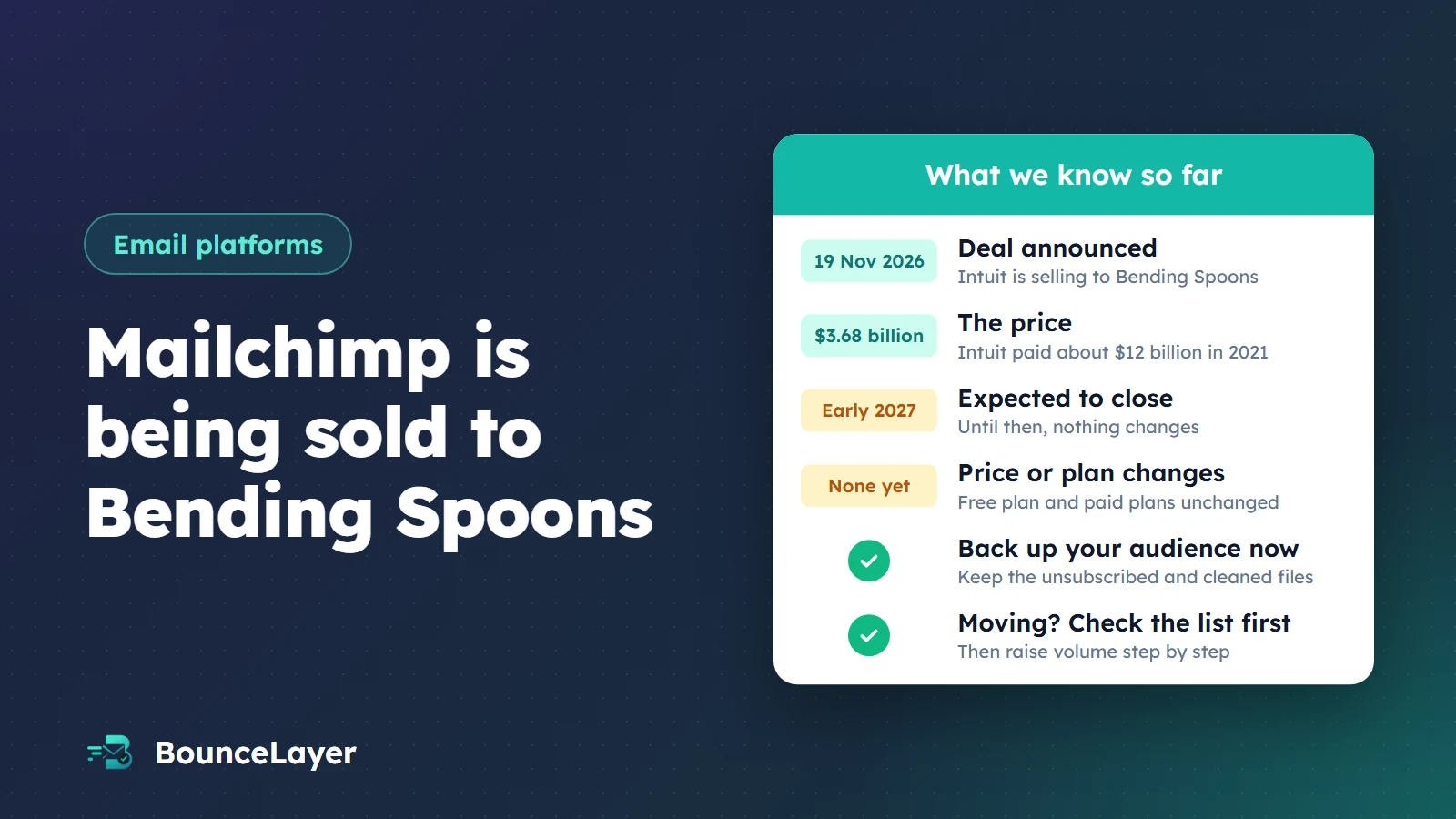
Bending Spoons agreed on 19 November 2026 to buy Mailchimp from Intuit for $3.68 billion. The deal is expected to close in early 2027, and until then Intuit still runs Mailchimp: no change to prices, plans or the free plan has been announced. You don't need to leave today. Do export a full backup of your audience now, including unsubscribed and cleaned contacts. If you later move to another email service, carry your unsubscribes and bounces across, check the list for dead addresses, and raise your sending volume gradually.
What was announced
On 19 November 2026 Bending Spoons, an Italian technology company, said it had signed a definitive agreement to buy Mailchimp from Intuit. Intuit bought Mailchimp in 2021 for about $12 billion, so the sale price is less than a third of that.
Intuit says the sale lets it focus on its AI tools for businesses. Mailchimp's revenue fell 1% to $313 million in Intuit's latest quarter, according to CNBC, while Intuit's total revenue grew 12%.
Bending Spoons buys well-known software products and runs them itself. Its own list of main businesses includes Evernote, WeTransfer, Vimeo, AOL, Eventbrite, Brightcove, Airtable and Miro.
Bending Spoons's press release, filed with the US Securities and Exchange Commission on 19 November 2026; CNBC (19 November); TechCrunch (20 November); Marketing Dive (23 November); and SpamResource (19 November). Checked on 25 November 2026. We'll update this guide when either company announces a change.
| Question | What is confirmed |
|---|---|
| Who is buying Mailchimp? | Bending Spoons, based in Milan, Italy |
| Who is selling? | Intuit, which bought Mailchimp in 2021 for about $12 billion |
| Price | $3.68 billion enterprise value. Intuit will put $368 million of the proceeds into new Bending Spoons shares |
| When was it announced? | 19 November 2026 |
| When does it close? | Expected in early 2027, subject to regulatory approvals |
| Who runs Mailchimp until then? | Intuit |
| Announced changes to prices or plans | None |
What changes for Mailchimp customers right now
Nothing. Your account, contacts, campaigns, automations and bill stay exactly as they are. The deal has been agreed but not completed, and Intuit keeps running Mailchimp until it closes.
Both companies have said only general things about the future. Bending Spoons's chief executive, Luca Ferrari, said: "After closing, we'll invest substantially in the business, building on the powerful, easy-to-use tools customers already value and rely on." Intuit's Jack Tam said: "We are focused on ensuring a smooth transition for Mailchimp's customers, partners, and employees."
Neither company has said anything about prices, plan limits or the free plan. Al Iverson of SpamResource, who has covered email deliverability for more than two decades, summed it up: "Until the transaction closes in early 2027, operations remain business as usual."
- Mailchimp's free plan today: up to 250 contacts and 500 emails a month, with a limit of 250 a day (Mailchimp's pricing page, checked 25 November 2026).
- Paid plans today: Essentials, Standard and Premium, priced by the number of contacts.
- What nobody knows yet: whether prices, plan limits, the free plan or support will change after closing, and when.
Staying or moving, your export is only as good as the addresses in it. See how to check a Mailchimp audience for dead addresses.
Clean a Mailchimp listWhat Bending Spoons has done with other products
People are asking about prices because of what happened after earlier Bending Spoons purchases. Here is what was reported, with dates.
Nobody outside the two companies knows what will happen to Mailchimp's prices. Anyone who tells you the free plan is ending, or that prices will double, is guessing. What the history does justify is being ready to move quickly if you need to.
- The pattern is not only cuts. TechCrunch says that in each case Bending Spoons moved the product onto shared engineering and revenue systems, "resulting in significant cost savings while often improving the available support and product resources".
- Changes took time. Evernote's free plan changed almost a year after the purchase was completed.
- Mailchimp is a different kind of product. It is Bending Spoons's largest purchase by price so far, and Ferrari has promised to invest in it.
| Product | Bought | What was reported afterwards |
|---|---|---|
| Evernote | Agreed November 2022, completed January 2023 | 129 staff laid off in February 2023. From 4 December 2023 the free plan was limited to 50 notes and one notebook (TechCrunch) |
| WeTransfer | July 2024 | In September 2024 Bending Spoons confirmed plans to cut about 75% of staff (TechCrunch) |
| Harvest | 2025 | In 2026 pricing moved from a flat price per seat to a seat fee plus usage charges. Subscription Insider reported some renewals rising by about 1,500%, and Bloomberg covered customer complaints |
Should you leave Mailchimp?
Not because of a headline. Moving email platforms costs time and carries real deliverability risk, so move for a reason: a price you can't accept, a feature you lose, or a tool that suits you better. For most senders the right move this month is to prepare, not to leave.
Black Friday is 27 November 2026 and Cyber Monday is 30 November. Changing your email platform in the busiest sending week of the year is the riskiest time to do it. Send your sale from the setup that already works, and plan any move for January.
| Your situation | Sensible move |
|---|---|
| Mailchimp works and the price is fine | Stay. Back up your audience and watch for announcements after the deal closes |
| You're on the free plan or a small paid plan and a price rise would hurt | Back up now and shortlist one alternative, so you could move in days instead of weeks |
| You rely on automations, a store connection or many integrations | Stay for now. Write down how each one is set up, because rebuilding them is the slow part of any move |
| You were already unhappy with the price or the product | Move, but pick a quiet sending period and follow the steps below |
Five things to do now, even if you stay
These take under an hour and cost nothing. They protect you whatever the new owner decides.
- Export your whole audience. In Mailchimp, open Audience, choose Export audience, then Export CSV. You get a ZIP file with a separate CSV for each type of contact. Only account Owners and Admins can do this, and Mailchimp keeps each export available for 30 days.
- Export what the audience export leaves out. Archived contacts are exported separately. Opens, clicks and purchase history are not in the audience export at all, so download your campaign reports too.
- Write down your setup: the DNS records you added for Mailchimp, every sign-up form and where it is embedded, each automation and its emails, and every app connected to the account.
- Check what you are paying for. Mailchimp counts subscribed, unsubscribed and non-subscribed contacts towards your plan. Cleaned and archived contacts don't count, so archiving people you no longer email can lower your bill today.
- Store the export safely and repeat it monthly. It contains personal data, so keep it somewhere access-controlled, not in a shared folder or an email attachment.
What is in a Mailchimp export, and what to do with each file
The most common mistake in a move is importing only the subscribed file and throwing the rest away. The other files are your record of who must not be emailed. Mailchimp explains that "hard bounces and repeated soft bounces become cleaned contacts", and a new email service knows none of that unless you tell it.
The export includes when and from which IP address each person signed up and confirmed (OPTIN_TIME, OPTIN_IP, CONFIRM_TIME, CONFIRM_IP). That is your proof of consent. Keep those columns when you import, or at least keep the original files.
| File | Who is in it | What to do at the new service |
|---|---|---|
| Subscribed | People who opted in to your marketing email | Check for dead addresses, then import as subscribers |
| Unsubscribed | People who opted out | Import as unsubscribed or suppressed. Never email them again |
| Cleaned | Addresses that hard bounced, or soft bounced many times | Import as suppressed. Don't add them back as subscribers |
| Non-subscribed | People who interacted with you, such as store customers, but never opted in | Don't send them marketing email. Keep the file as a record |
| Archived (separate export) | Contacts you removed from the audience yourself | Usually leave out. Re-add only people who opted in and whom you still want to email |
Why switching email platforms can hurt deliverability
Your domain's reputation moves with you, as long as you keep sending from the same address on your own domain. Almost everything else changes, and mailbox providers notice.
- New servers. Your mail now comes from different IP addresses, usually shared with the new service's other customers. Google's sender guidelines say: "After making any significant changes to your sending infrastructure or email header structure, increase the modified segment of traffic separately."
- Lost memory. Mailchimp has quietly removed your bounces for years. The new service starts with no record of them, so one careless import puts every dead address back on your list.
- "Subscribed" doesn't mean deliverable. Mailchimp only learns an address is dead when you email it. People you haven't mailed in months may have closed their mailbox since, and Mailchimp allows 7 soft bounces (15 for contacts with past activity) before it cleans an address.
- New accounts are watched closely. Many email services review or pause a new account whose first sends bounce heavily or draw complaints. Aim to stay under a 2% bounce rate from the first send.
- Lost engagement history. Opens and clicks don't come with the export, so the new service can't tell your active readers from people who haven't opened in two years.
How to move your list without hurting deliverability
Work through these in order. Keep your Mailchimp account open until the last step is done.
After each of the first few campaigns, check the bounce rate, the spam complaint rate in Google Postmaster Tools, and whether clicks from Gmail, Outlook and Yahoo addresses look normal. If one provider drops sharply, pause and fix it before raising volume.
- Authenticate your domain at the new service first. Add the DKIM records it gives you, and leave Mailchimp's records (two CNAME records for DKIM) in place until your last Mailchimp send. Several DKIM records can sit side by side.
- Keep one SPF record and one DMARC record. If the new service asks for SPF, add it to your existing record instead of creating a second one. Your DMARC record doesn't need to change.
- Import the do-not-send list before anything else: the unsubscribed and cleaned files, marked as unsubscribed or suppressed.
- Check the subscribed file for dead addresses before you import it, so the first campaign from the new service doesn't bounce.
- Keep the same From address and domain. Don't change your platform, domain and email design all at once, or you won't know which change caused a problem.
- Start with your most engaged subscribers. Google's advice is to "start with a low sending volume to engaged users, and slowly increase the volume over time". The MEMBER_RATING column in the export shows who has been most active.
- Raise volume in steps. One common pattern, not an official rule, is to roughly double the audience every few sends while bounces stay under 2% and Gmail's spam rate stays under 0.1%. A small list of a few thousand people can move much faster than a list of hundreds of thousands.
- Move the moving parts: sign-up forms, welcome and other automated emails, and store or CRM connections. Send a test sign-up through each form to confirm it reaches the new service.
- Run both for a short overlap, then export Mailchimp one last time. Anyone who unsubscribed or bounced during the move must be added to the new do-not-send list before you close the account.
Mistakes to avoid when you move
Most migration problems come from the same few shortcuts.
- Importing every file as subscribers. This emails people who opted out and addresses that already bounced.
- Sending to the whole list on day one. A sudden full-volume send from a new service looks like a spammer's pattern.
- Using the move to "win back" old contacts. Re-adding people you stopped emailing years ago brings bounces, spam traps and complaints just when your new account is being judged.
- Deleting Mailchimp's DNS records too early. Mail still going out through Mailchimp, including automations you forgot, will fail authentication.
- Closing the Mailchimp account before a final export. You lose the unsubscribes and bounces from the overlap period.
- Forgetting forms. An old embedded form keeps adding subscribers to an account you no longer send from.
Common questions
Did Bending Spoons buy Mailchimp?
Bending Spoons signed an agreement to buy Mailchimp from Intuit on 19 November 2026, for an enterprise value of $3.68 billion. The purchase is not complete yet. It is expected to close in early 2027, subject to regulatory approvals, and Intuit runs Mailchimp until then.
Is Mailchimp shutting down?
No. Mailchimp is changing owner, not closing. Bending Spoons's chief executive said the company will "invest substantially in the business" after the deal closes. Your account, contacts and campaigns keep working as before.
Will Mailchimp raise its prices after the sale?
Nobody knows yet. As of 25 November 2026, neither Intuit nor Bending Spoons has announced any change to Mailchimp's prices or plans. Bending Spoons changed pricing at some products it bought earlier, such as Evernote and Harvest, which is why many customers are preparing a backup plan.
Is Mailchimp's free plan going away?
No change has been announced. Today the free plan allows up to 250 contacts and 500 emails a month, with a daily limit of 250. Bending Spoons limited Evernote's free plan to 50 notes in December 2023, about a year after buying it, but that doesn't tell us what will happen to Mailchimp.
Should I leave Mailchimp now?
Not just because of the sale. Nothing has changed yet, and moving email platforms carries deliverability risk. Export a full backup of your audience now, note how your forms, automations and DNS records are set up, and decide once real changes are announced. If you do move, avoid your busiest sending weeks.
How do I export my contacts from Mailchimp?
Open Audience, choose Export audience, then Export CSV. Mailchimp creates a ZIP file with separate CSV files for subscribed, unsubscribed, non-subscribed and cleaned contacts. Archived contacts are exported separately. Only account Owners and Admins can export, and each export stays available for 30 days.
Will switching email platforms hurt my deliverability?
It can, for a few weeks, if you move carelessly. Your mail comes from new servers and the new service has no record of your bounces and unsubscribes. To avoid problems, authenticate your domain first, import unsubscribed and cleaned contacts as a do-not-send list, check the list for dead addresses, and start with engaged subscribers before raising volume.
Do unsubscribes carry over when I change email service?
Not automatically. You have to export the unsubscribed and cleaned files from Mailchimp and import them into the new service as unsubscribed or suppressed contacts. Anti-spam laws such as CAN-SPAM in the US and GDPR in Europe still apply to those opt-outs after you move.