What Is an MX Record? How to Do an MX Lookup and Fix Common Problems
MX records decide where a domain's email goes. Here's how they work, how to look them up in seconds, what the numbers mean, and how to fix the mistakes that stop email arriving.
 Written byBounceLayer Team
Quick answer
An MX (mail exchanger) record is a DNS record that tells the world which mail servers receive email for a domain. Each MX record has a hostname and a priority number, and sending servers try the lowest number first. To check a domain's MX records, use a free MX lookup tool or run "dig MX example.com" (or "nslookup -type=mx example.com" on Windows). If a domain has no working MX records, email sent to it bounces.
What is an MX record?
MX stands for mail exchanger. An MX record is an entry in a domain's DNS, the internet's address book, that names the servers responsible for receiving email for that domain. When you send an email to anna@example.com, your mail server doesn't know where Anna's inbox lives. It looks up the MX records for example.com and delivers the message to the server they point to.
Every domain that receives email needs MX records, whether it's a giant like gmail.com or a small business using Google Workspace, Microsoft 365, Zoho or the email that came with its web hosting. The domain's owner sets them in their DNS provider's dashboard, usually when they first set up email.
What an MX record looks like
An MX record has three parts that matter: the host (which domain or subdomain it applies to, usually @ for the main domain), a priority number, and the target, which is the hostname of the mail server. Here's what a real lookup returns for a domain that uses Hostinger's email, followed by one for gmail.com itself.
$ dig MX bouncelayer.com +short
5 mx1.hostinger.com.
10 mx2.hostinger.com.

$ dig MX gmail.com +short
5 gmail-smtp-in.l.google.com.
10 alt1.gmail-smtp-in.l.google.com.
20 alt2.gmail-smtp-in.l.google.com.
30 alt3.gmail-smtp-in.l.google.com.
40 alt4.gmail-smtp-in.l.google.com.
Look up any domain's mail servers in seconds, and see which email provider runs them. Free, with no sign-up.
Run a free MX lookupWhat do MX priority numbers mean?
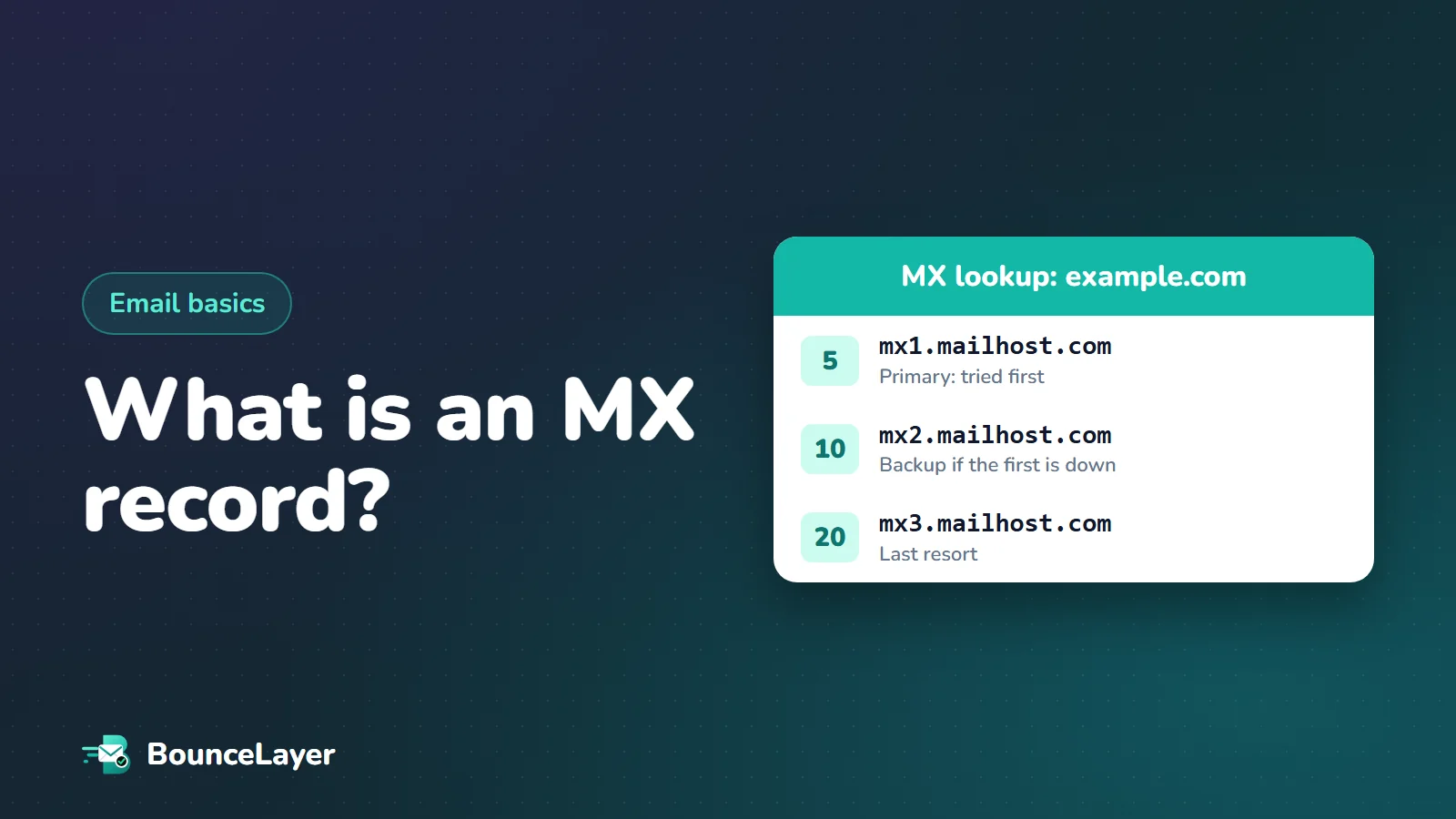
The number in front of each server is its priority, sometimes called preference. Lower numbers come first. A sending server tries the server with the lowest number, and only moves to the next one if it can't connect. In the Hostinger example above, mail goes to mx1 (priority 5) and falls back to mx2 (priority 10) if mx1 is down.
The actual numbers don't matter, only their order. Priorities of 1 and 2 behave exactly like 10 and 20. When two records share the same number, senders treat them as equals and spread mail between them. Email security company Mimecast, for example, publishes two inbound servers both at priority 10, so incoming mail is shared across them.
- Lowest number: the primary server, tried first.
- Higher numbers: backups, used only if the servers before them don't answer.
- Equal numbers: load sharing between servers.
How to do an MX lookup
You can check any domain's MX records in a few seconds, and you don't need to own the domain. The records are public by design, because every sender in the world needs to read them.
The quickest way is a free online MX lookup: type the domain and it lists the mail servers, their priorities and which email provider runs them. If you prefer the command line, each operating system has a built-in tool.
# macOS and Linux
dig MX example.com +short

# Windows (Command Prompt)
nslookup -type=mx example.com

# Windows (PowerShell)
Resolve-DnsName -Type MX example.com
How to tell which email provider a domain uses
The hostnames in an MX lookup usually reveal who handles the domain's email. That's useful when you're setting up email, troubleshooting a delivery problem, or researching who you're emailing. Here are the patterns you'll see most often.
| MX hostname contains | Email provider |
|---|---|
| smtp.google.com or aspmx.l.google.com | Google Workspace |
| mail.protection.outlook.com or mx.microsoft | Microsoft 365 |
| zoho.com or zoho.eu | Zoho Mail |
| hostinger.com | Hostinger email |
| protonmail.ch | Proton Mail |
| mimecast.com or pphosted.com | A security gateway (Mimecast or Proofpoint) in front of the real mailbox provider |
MX records for the most popular providers
Always copy the exact values from your provider's admin console, because some depend on your domain or region. These are the standard setups so you know what to expect.
Use either the single smtp.google.com record or the five ASPMX records, not both. Mixing them makes routing unpredictable.
- Google Workspace (set up in 2023 or later): a single MX record, host @, priority 1, value smtp.google.com. Google's help pages say it can take up to 72 hours for new MX records to be recognised.
- Google Workspace (older setup): five records, starting with ASPMX.L.GOOGLE.COM at priority 1, followed by the ALT1 to ALT4 servers. Google says this setup continues to work, so there's no need to change it if your email is working.
- Microsoft 365: one MX record whose value is based on your domain name, traditionally in the form yourdomain-com.mail.protection.outlook.com. Microsoft has been moving newer domains to hostnames ending in mx.microsoft to support DNSSEC, so use the exact value shown in the Microsoft 365 admin centre.
- Zoho Mail: three records, mx.zoho.com, mx2.zoho.com and mx3.zoho.com, with increasing priorities. Accounts in other regions use their regional domain, such as zoho.eu.
- Hostinger email: mx1.hostinger.com at priority 5 and mx2.hostinger.com at priority 10.
Common MX record problems and how to fix them
Most MX problems are small typos or leftovers from a previous email provider. The symptom is almost always the same: some or all email to the domain bounces, or quietly goes to an old mailbox nobody checks.
| Problem | What happens | Fix |
|---|---|---|
| No MX records at all | Senders fall back to the domain's A record, which usually isn't a mail server, so mail bounces | Add your provider's MX records |
| Old provider's records still present | Some mail goes to the old service | Delete every MX record that isn't from your current provider |
| MX points to an IP address | Not allowed; many senders won't deliver | Point MX at a hostname, and give that hostname an A record |
| MX points to a CNAME | Against the DNS rules; delivery can fail | Point MX at the real hostname instead of an alias |
| Domain added twice | The value becomes mx.example.com.example.com | Enter the value exactly as given; some panels need a trailing dot |
| Target hostname doesn't exist | Mail can't be delivered | Check the spelling against your provider's instructions |
| Record on the wrong host | Email works for a subdomain but not the main domain, or the reverse | Use @ (or leave the host blank) for the main domain |
No MX record found: what it means
When an MX lookup returns nothing, the domain hasn't published any mail servers. Under the email standards, a sender then tries the domain's own address (its A record) as a last resort. On most domains that's a website, not a mail server, so the email bounces.
There's also a special case called a null MX: a single record pointing to "." with priority 0. It's a domain's way of saying, deliberately, that it never accepts email, and it's defined in a standard called RFC 7505. Domains that only send email, such as some notification domains, use it so that mistaken mail fails straight away instead of waiting in queues.
If you see no MX records, or a null MX, for an address on your mailing list, that address can't receive email. Common causes are typos in the domain (gmial.com, hotmial.com), companies that have closed, and made-up addresses.
MX records and email verification
Checking MX records is one of the first steps of any email verification. If a domain has no working mail servers, every address on it will bounce, so there's no point sending. That makes an MX check a fast, free way to catch a whole class of bad addresses in a list: dead domains, typos and invented addresses.
An MX check alone can't tell you whether a particular mailbox exists, though. A domain can have perfect MX records while the person you're writing to left the company last year. Full verification goes a step further and checks the mailbox itself, without sending any email to it.
Before emailing an old or imported list, look for domains with no MX records. They're the easiest bounces to prevent, and they often reveal typos you can fix.
MX records vs SPF, DKIM and DMARC
People often mix these up because they all live in DNS and all relate to email. The difference is direction. MX records are about receiving: they tell the world where to deliver email for your domain. SPF, DKIM and DMARC are about sending: they prove that email claiming to come from your domain really does.
That means changing your MX records doesn't affect how your outgoing email is authenticated, and correct MX records don't protect you from someone sending fake email in your name. For that, you need SPF, DKIM and DMARC set up as well. If you're changing email providers, you'll usually update all of them together.
| Record | Controls | Question it answers |
|---|---|---|
| MX | Receiving | Where should email for this domain go? |
| SPF | Sending | Which servers may send email for this domain? |
| DKIM | Sending | Was this email signed by the domain and left unchanged? |
| DMARC | Sending | What should happen to email that fails SPF and DKIM? |
How to change MX records without losing email
Switching email providers is the moment most MX problems happen. A little preparation avoids lost messages.
- A day or two before the switch, lower the TTL on your MX records (for example to 300 seconds) so the change spreads faster.
- Set up the mailboxes at your new provider before you touch DNS, so mail has somewhere to land.
- Replace the old MX records with the new ones, and remove every old record.
- Keep the old mailboxes open for a few days, because some senders may still deliver to the old servers while DNS updates.
- Run an MX lookup to confirm only the new records appear, then send yourself a test email from an outside account.
- Update SPF and DKIM for the new provider at the same time, so your outgoing email keeps passing authentication.
Common questions
What does MX stand for?
Mail exchanger. An MX record names the servers that receive email for a domain.
How do I check my MX records?
Use a free online MX lookup tool, or run "dig MX yourdomain.com" on macOS or Linux, or "nslookup -type=mx yourdomain.com" on Windows.
Is a lower or higher MX priority better?
Lower numbers are tried first. Use the lowest number for your main mail server and higher numbers for backups.
Can a domain have more than one MX record?
Yes. Most do. Several records give backup servers, and records with the same priority share incoming mail between them.
How long do MX record changes take?
Often minutes, but it depends on the record's TTL and on caching. Google says new MX records can take up to 72 hours to be recognised everywhere.
Can an MX record point to an IP address?
No. An MX record must point to a hostname, and that hostname needs its own A or AAAA record with the IP address.
Do MX records affect whether my emails go to spam?
Not directly, because MX records only control receiving. Spam placement depends on SPF, DKIM, DMARC, your list quality and how recipients respond to your email.
What is a null MX record?
A single MX record pointing to "." with priority 0. It tells senders the domain never accepts email, so messages fail straight away.